Check two things. In portfolio margin mode, perpetuals support net mode only, which is the API's name for one-way mode, so hedge mode isn't on offer. If the switch fails with API error 59000, the message is that settings failed and open positions or orders have to be closed before they can be changed: cancel your open orders, close the position, then switch.
In isolated margin, yes. The OKX API guide lists leverage for perpetuals under isolated margin and long/short position mode (hedge mode) as set at contract and position side level, so the long side and the short side can each carry their own multiplier.
Place a short order larger than the long. The OKX help page says that once the long is fully closed, only the short position remains, so whatever exceeds the long becomes your short. The other route is the reverse button, which closes the existing position and immediately opens an opposite one with the same quantity in a single action. If available margin is insufficient, a smaller reverse position may be opened; OKX states that successful execution is not guaranteed, and the button has to be enabled in trading settings first.
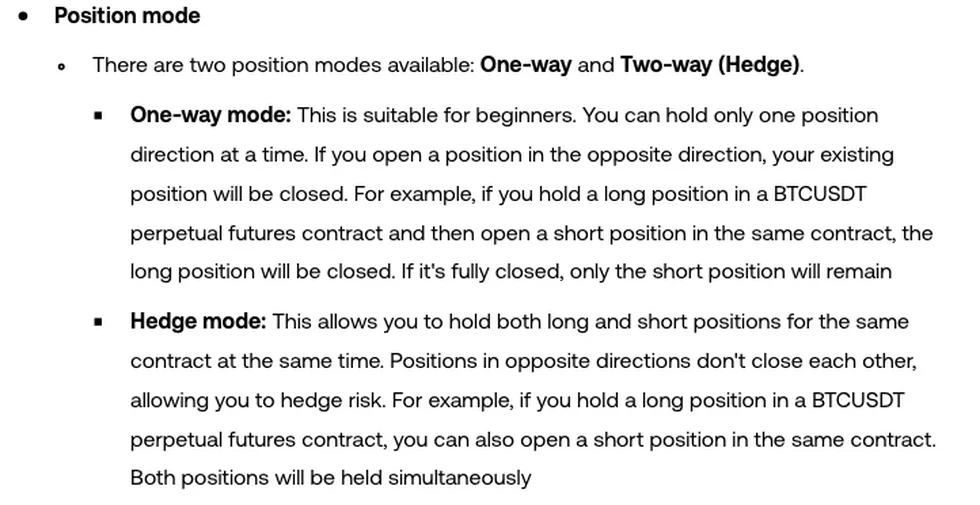
You hold 1 contract long on the BTCUSDT perpetual on OKX and place an order for 1 contract short. In one-way mode the long is closed and nothing is left on that contract. In hedge mode the long stays exactly as it was and a 1-contract short appears next to it. If your long vanished the moment the short filled, the account is most likely set to one-way mode.
1. What happens when you short 1 contract while holding 1 long
| Item | One-way mode | Hedge mode |
|---|---|---|
| Before the order | 1 contract long, BTCUSDT perpetual | 1 contract long, BTCUSDT perpetual |
| Action | Place 1 contract short | Place 1 contract short |
| What the short does | Closes the existing long | Opens a new short position |
| Positions afterwards | None | 1 contract long + 1 contract short |
| Directions you can hold at once | One | Two, long and short |
| OKX help page wording | “You can hold only one position direction at a time. If you open a position in the opposite direction, your existing position will be closed.” | “Positions in opposite directions don't close each other” |
| If the short is 2 contracts (derived from the rule) | 1 contract closes the long, the other 1 becomes a short | 1 contract long + 2 contracts short |
One-way mode keeps a single direction per contract. One long contract meeting one short contract nets to zero, and only the part of the short that exceeds the long turns into a new short position. OKX's own BTCUSDT example ends the same way: “If it's fully closed, only the short position will remain”. The last row of the table applies that sentence: +1 contract and −2 contracts net to −1, a 1-contract short.
This matters for anyone trying to lock a position, that is, to keep the long and add an equal short so the two offset each other. In one-way mode that short simply closes the long and leaves the contract flat, and a short that is too large leaves you with a short position instead. Holding both sides at once requires switching the position mode to hedge mode.
Hedge mode has a merging rule of its own: orders of the same side, type and currency are automatically merged into one position, and separate positions aren't supported. A second 1-contract short placed while you already hold a 1-contract short joins the existing short position; it doesn't start another one. Margin mode is the exception. Orders with a different margin mode aren't merged, so one cross order and one isolated order become two positions even when the crypto, direction and futures type are identical. Those two positions also react differently to a liquidation, which is the whole question behind isolated or cross margin on OKX perpetuals.
2. What the API docs call the same two modes
The app and the help center say one-way mode and hedge mode. The OKX API guide, read in October 2026, says net mode and long/short mode, and defines the pair in one line: “In net mode, users can only have positions in one direction; In long/short mode, users can hold positions in long and short directions.” The two sets of names line up like this:
| Help center / app | API guide | posMode value |
|---|---|---|
| One-way mode | net mode | net_mode |
| Hedge mode | long/short mode | long_short_mode |
posMode only applies to delivery futures and perpetuals, which the API labels FUTURES and SWAP. The guide's leverage section also writes buy/sell position mode where the rest of it writes net mode, so one setting goes by three names. When a tutorial or an endpoint description mentions long/short mode or net mode, read hedge mode or one-way mode.
3. Where the switch is, and why it sometimes won't go through
In the app, open Trade, pick Futures, tap the Menu (...) icon, then go to Settings → Trading mode → Position Mode and choose One-way mode or Hedge mode. The route comes from the OKX help center article How do I set up the commonly used transaction features?, which shows an update date of Oct 7, 2026. That article first lists the two options as One-way and Two-way (Hedge), then calls them One-way mode and Hedge mode a line later; they are the same pair.
The account mode doesn't allow it. OKX account modes are Spot mode, Futures mode and Advanced mode, and Advanced mode includes cross-currency margin mode and portfolio margin mode. Spot mode trades spot and leverage products only, so it never reaches perpetuals and position mode means nothing there. In the API guide, Futures mode and Multi-currency mode (its name for cross-currency margin) let delivery futures and perpetuals use either position mode, while portfolio margin mode supports net mode only, which is one-way mode. An account running portfolio margin can't be switched to hedge mode.
The switch returns an error. The API error-code table has two entries that fit, and the docs don't say which endpoint each belongs to. Code 59000 reports that settings failed and that open positions or orders must be closed before settings are modified; code 59001 reports that switching is unavailable while the account has borrowings. If 59000 appears when you change position mode, cancel the open orders and close the positions first. Someone holding a long in one-way mode who wants hedge mode in order to hedge it has to close, switch and reopen. For 59001, deal with the borrowing first.
4. When hedge mode is worth turning on
How the two modes handle three situations:
| Situation | One-way mode | Hedge mode |
|---|---|---|
| Holding a long and a short on the same contract at once | Not possible | Possible; the help page presents it as a way to hedge risk |
| Separate leverage for long and short in isolated margin | Only one direction exists, so it doesn't arise | Possible; in the API guide, perpetual leverage under isolated margin and long/short position mode is set at contract and position side level |
| An order placed in the wrong direction by mistake | The existing position is partly or fully closed; if the order is larger than the position, the excess becomes a position the other way | The existing position is untouched and an opposite position is added |
An opposite order in one-way mode eats into the position you hold. In hedge mode it doesn't, but it leaves a locked long-and-short pair, and whichever way the market moves, one leg is losing. If you trade one direction at a time and have no plan to hedge on the same contract, our suggestion is to stay in one-way mode: you can't open a locked pair by accident, and take-profit, stop-loss and reduce-only orders behave more plainly, because a close is a close. In the API the reduce-only parameter for perpetuals works in net mode only, as the next section shows. Each of the OKX TP/SL and conditional order types also has its own trigger rule on top of that.
Hedge mode earns its place when you need both directions on one contract, for example a long you don't want to touch yet and a short opened against it as a hedge. The mode itself only guarantees that the two positions won't close each other; how much the hedge offsets depends on how you size the two sides.
If all you want in one-way mode is to flip from long to short, the reverse button does it: it closes the existing position and immediately opens an opposite position with the same quantity in a single action. If available margin is insufficient, a smaller reverse position may be opened. OKX adds that execution depends on market conditions, margin requirements and risk controls, and that “Successful execution is not guaranteed”. The Simplified Chinese edition of the page gives two further details: the close is done at market price, and the reverse position is capped at the instrument's maximum size for a single market order. The button appears only after two settings are on: under Interface settings, select Futures Position Button and enable Reverse Position Opening, and under Preferences > Trade confirmations, enable Reverse Position Confirmation.
5. API orders: what changes for posSide and reduceOnly
For anyone trading through the API or a bot, changing position mode changes the order parameters. From the place-order and close-positions endpoints in the OKX API guide:
| Parameter | Net mode (one-way) | Long/short mode (hedge) |
|---|---|---|
| posSide on the order endpoint | Not required; the requirement applies to long/short mode only | Required, and can only be long or short; omitting it on delivery futures or perpetuals returns 51000 (parameter error) |
| posSide on the close-positions endpoint | Can be omitted and defaults to net; if sent, net is the only valid value | Required: long to close a long, short to close a short |
| reduceOnly | Applies to delivery futures and perpetuals | Doesn't apply to delivery futures or perpetuals |
With reduceOnly set to true, an order can only reduce the size of a position and never add to one. The guide limits it to margin orders and to delivery futures and perpetual orders in net mode. A strategy that relies on it to stop an oversized closing order from opening a position the other way loses that safeguard once the account is in long/short mode; which side gets reduced then has to be stated through posSide.
A bot written for net mode that never sends posSide will have every perpetual order rejected with 51000 after someone switches the account to hedge mode in the app. Nothing gets through until the account goes back to one-way mode or the code starts sending posSide.