Yes. You can reduce and close existing positions and adjust margin and leverage; only adding to positions and opening new ones is rejected. There is one exception that cuts the other way: strategy orders and copy trading orders are rejected whether they open or close a position, so if you want out, close manually.
No. OKX states that the cool-off period can't be ended early, and customer support can't end it for you either. So choosing 1, 3, 7, 14 or 30 days is irreversible; pick based on how long you're sure you won't need to open a new position.
It depends on when you turned it on. A cool-off period enabled after the 7 July 2026 upgrade also blocks REST API, WebSocket, third-party authorizations (including Broker OAuth, Agent Trade Kit, etc.) and trading bots. Users who had already configured one before the upgrade stay on the existing service, which only blocks orders placed on the web and app pages — in other words, those newly added channels aren't blocked during their current cool-off period. This exception appears in the 3 July 2026 announcement; the help page updated on 26 August 2026 doesn't repeat it.
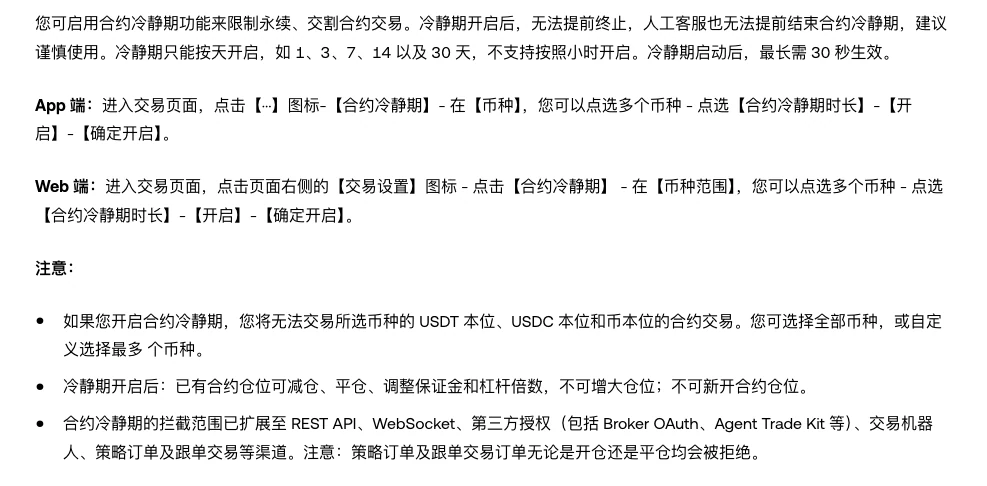
On the app, tap the More (···) icon on the trading page and open Cooling-off period; on the web, click the Settings icon on the right of the trading page and open Cooling-off period. Choose your cryptos and duration, then tap Enable and Confirm. Durations are in days only, such as 1, 3, 7, 14 or 30 days, not hours; once activated, it can take up to 30 seconds to take effect.
OKX only names strategy orders and copy trading; it doesn't say clearly whether TP/SL orders fall into that category. Don't assume they'll stop working, and don't assume they won't be affected either. Before you turn it on, check on the page what type your open orders are, and leave room to close manually if needed.
1. Once it's on, which buttons still work
First, draw the boundary clearly: existing positions can be reduced or closed, and their margin and leverage adjusted; adding to positions and opening new ones is always rejected. OKX's help page puts it as "You can reduce or close existing futures positions", "You can adjust margins and leverage for existing positions" and "You can't increase positions or open new futures positions". Note that it says leverage can be adjusted, not that it can only be lowered — don't misremember it as "lower only".
| Action | During the cool-off period | Official wording |
|---|---|---|
| Reduce or close a position | Allowed | Help page: "reduce or close existing futures positions" |
| Adjust margin or leverage | Allowed | Help page: "adjust margins and leverage for existing positions" |
| Add to a position (make an existing position bigger) | Not allowed | Help page: "can't increase positions" |
| Open a new futures position | Not allowed | Help page: "can't … open new futures positions" |
| Strategy orders and copy trading orders | Rejected whether opening or closing | Upgrade notice: "rejected regardless of whether they are for opening or closing positions" |
Blocking works by crypto. According to the Chinese-language version of the help page (the English page doesn't spell this out), whichever cryptos you select, their USDT-margined, USDC-margined and coin-margined contracts for those cryptos all go off-limits together, not just one of the three; select all cryptos and you can't open a new position in any perpetual or expiry futures contract.
Following the rules through, here's how what you can and can't do splits: requests to reduce, close, adjust margin or adjust leverage are accepted; try to open a new direction, or add a little more to the position you already hold, and the order bounces back. What the cool-off period stops is the hand reaching for "just one more".
Leaving leverage adjustment open means risk management moves aren't locked away along with everything else — but OKX's forced liquidation FAQ says that simply adjusting the leverage won't change the estimated liquidation price; it only changes the occupied margin and the available balance. We've broken down how margin mode relates to liquidation price in Isolated or cross margin? How to choose on OKX perpetuals; the cool-off period doesn't change that math, it just stops positions from getting bigger.
2. Two ways to turn it on: choose by crypto, durations in days only
Both entry points sit in the trading page settings; the app and web differ only in the first two steps.
App: go to the trading page → tap the More (···) icon → Cooling-off period → under Crypto, select one or more cryptos → choose the Period → Enable → Confirm.
Web: go to the trading page → click the Settings icon on the right of the page → Cooling-off period → under Scope, select one or more cryptos → choose the Period → Enable → Confirm.
In the crypto field you can select multiple cryptos (the Chinese-language page adds that you can pick all of them or a custom set). On the Chinese-language help page, the sentence giving the limit for a custom selection has a blank where the number should be (OKX left it out), so we don't give a number here — when you're clicking through on the page, go by how many it actually lets you tick.
Durations are in days only: 1, 3, 7, 14 or 30 days; you can't turn it on by the hour. Anyone hoping to "lock it for a couple of hours first" will be disappointed at this step — the shortest option is one day.
Tapping Confirm doesn't take effect instantly either. The help page says "After the cooling-off period is activated, it may take up to 30 seconds to take effect", and the July upgrade notice says it again: "the new restrictions may take up to 30 seconds to come into effect". That half-minute has a very concrete meaning: if you turn on a cool-off period in the heat of the moment and then fire off one more order straight away, that order may still go through. So for the half-minute after you tap Confirm, keep your hands off the order button until it's passed.
The two paths, crypto scope and durations above come from the cool-off section of OKX's help article How do I set up the commonly used transaction features? (published 30 July 2025, updated 26 August 2026). OKX also has an older help page on the same feature with different wording, and the interface itself gets redesigned from time to time; once you're in, follow what the page currently says.
3. Can you turn it off early? No, and neither can customer support
This is the single most important thing to take away from this article: once enabled, the cool-off period can't be ended early, and customer support can't end it for you either. The help page follows that sentence with "Please use this feature with caution".
So once a cool-off period starts, there's no stopping it, and the duration and crypto scope are locked in for that period; OKX doesn't say whether the scope can be changed midway, so plan as if it can't. When choosing between 1 day and 30 days, the test isn't "how long do I want to cool off?" but "for how long am I sure I won't need to open a new position?" — those two numbers are often different, and the second is the one to put in.
Before turning it on, run through a few things: does any position you hold rely on opening a new position to hedge it? If the market turns against you during this period, how do you plan to handle it (manually reducing and closing stays available; opening a new opposite position doesn't)? Is anything due to expire in this window that you'd need to re-establish? If you can't think it through, pick a short duration first — you can turn it on again after it expires, but you can't take it back.
There's also a common misconception: that you can get it reversed by explaining things to support or verifying your identity. According to OKX's own wording, that route doesn't exist. Treat it as a hard-wired switch, not a setting you can negotiate.
4. The 7 July 2026 upgrade extended blocking to API and bots
On 3 July 2026, OKX published its "Notice on Upgrade to the Futures Cool-off Period", with the upgrade itself on 7 July. Before the upgrade, the cool-off period blocked orders placed on the web and app pages; after it, the scope extended to channels including REST API, WebSocket, third-party authorization (including Broker OAuth, Agent Trade Kit, etc.) and trading bots. The help page's current wording adds strategy orders and copy trading to the end of that list.
The main rule is uniform: for users in a cool-off period, orders to open or increase positions submitted through any of these channels will be rejected, while orders to reduce or close positions are not affected.
There's only one exception, it runs the other way, and it's the easiest to trip over: strategy orders and copy trading orders will be rejected regardless of whether they are for opening or closing positions. In practical terms — if you were counting on a strategy or a copy trading relationship to close a position for you, it can't do that during the cool-off period; closing manually still works. Before you turn on a cool-off period, go through these orders and authorizations first, so "I thought something would close it for me" doesn't run into "the order can't actually get through".
So do TP/SL orders and conditional orders count as the "strategy orders" mentioned here? OKX only names strategy orders and copy trading; it doesn't say clearly whether TP/SL orders fall into that category. So don't assume either way: don't treat it as "my stop-loss will definitely stop working", and don't treat it as "my stop-loss definitely won't be affected". Before turning it on, check on the page which category your open orders belong to, and leave room to close manually if needed. How the different order types are classified is covered in OKX TP/SL and conditional orders, fully explained.
Near the end, the notice adds one more line: the feature will be available to users in certain regions starting 16 July 2026, and actual availability may vary. OKX doesn't say which regions, so this article won't fill that in either.
This section is based on OKX's Notice on Upgrade to the Futures Cool-off Period (published 3 July 2026) and the current wording of the help page from the previous section. The two describe the blocking scope slightly differently; go by whichever version of the page is current when you check.
5. If your cool-off period predates the upgrade, it still blocks the old scope
The notice sets aside a separate paragraph for existing users: users who configured the cool-off period before this upgrade will remain on the existing service, which only restricts orders placed via the web and app, and won't be subject to the newly expanded restrictions. In other words, the newly added channels aren't blocked during their current cool-off period. This exception is in the 3 July 2026 notice; the help page updated on 26 August 2026 doesn't repeat it, so when you look it up, check what the page currently says first.
Two accompanying lines are just as worth remembering: the current cool-off period can't be terminated early; and if you want the full restrictions, OKX's answer is to re-enable the cool-off period after your current one expires.
Existing users only need two checks. First, when did you turn this cool-off period on — before or after 7 July? Second, which API keys, trading bots and copy trading relationships are still active under your account? Put the two answers together and you have your actual current blocking scope. If you originally chose the 30-day option, the "protection" you had for that whole month may not have been the layer you thought it was.
This also explains something that looks contradictory: under these two sets of rules, old and new, two people who both have a cool-off period running, one enabled before the upgrade date and one after, genuinely have different blocking scopes — the page isn't wrong; each set of rules covers its own users.
6. Three "cool-off periods" that aren't the same thing, and it won't make decisions for you
First, clear up the name clash. The futures cool-off period restricts trading in perpetual and expiry futures, and it's what this whole article is about; exchanges also have a cool-off period for closing your account and cool-off periods or delays on withdrawals, which are two separate sets of rules on the account and funds side, each with its own triggers, durations and rules on whether it can be undone. Don't apply this article's conclusions to those two; whichever one you need, read its own official documentation.
Next, keep your expectations level. OKX describes it plainly: the futures cool-off period is a voluntary risk management tool that doesn't guarantee you'll avoid losses or adverse outcomes. It does exactly one thing — for a set period, it takes "open one more trade" off your list of options. It doesn't change the market, doesn't change the liquidation price of your existing positions, and doesn't decide for you when to close.
So it deals with your hand, not your judgement. If the problem is that the position was too big to begin with or your stop-loss level can't hold, a cool-off period just leaves you watching for that stretch, and the risk controls you're missing still have to come from you — for that layer, read on with The stop-loss vs position-size paradox.
To wrap up, back to the four things to settle before you tap Confirm: how many days (no undo), which cryptos to select, whether any positions rely on strategy orders or copy trading to close them, and whether to write down your manual closing plan first. Once all four have answers, then tap.